This tutorial shows you how to trace nested functions in Weave so you can monitor the full execution flow of an LLM-powered application, including its sub-functions and their parent-child relationships. By the end, you’ll be able to capture, visualize, and add metadata to nested traces in the Weave Traces page. LLM-powered applications can contain multiple LLM calls, additional data processing, and validation logic that’s important to monitor. You can track these nested functions and their parent-child relationships in Weave using the @weave.op() decorator (Python), or wrap it with weave.op() (TypeScript). Decorate functions and sub-functions as granularly as possible to capture the application’s complete execution flow. This helps you better understand and shape your application’s behavior.

Trace nested functions

This section steps through an example that traces a function and its nested sub-functions. The following code builds on the quickstart example and adds logic to count the returned items from the LLM and wrap them in a higher-level function. Additionally, the example uses weave.op() to trace every function, its call order, and its parent-child relationship:
import weave
import json
from openai import OpenAI

client = OpenAI()

@weave.op()
def extract_dinos(sentence: str) -> dict:
    response = client.chat.completions.create(
        model="gpt-4o",
        messages=[
            {
                "role": "system",
                "content": """Extract any dinosaur `name`, their `common_name`, \
names and whether its `diet` is a herbivore or carnivore, in JSON format."""
            },
            {
                "role": "user",
                "content": sentence
            }
            ],
            response_format={ "type": "json_object" }
        )
    return response.choices[0].message.content

@weave.op()
def count_dinos(dino_data: dict) -> int:
    # count the number of items in the returned list
    k = list(dino_data.keys())[0]
    return len(dino_data[k])

@weave.op()
def dino_tracker(sentence: str) -> dict:
    # extract dinosaurs using an LLM
    dino_data = extract_dinos(sentence)

    # count the number of dinosaurs returned
    dino_data = json.loads(dino_data)
    n_dinos = count_dinos(dino_data)
    return {"n_dinosaurs": n_dinos, "dinosaurs": dino_data}

weave.init('jurassic-park')

sentence = """I watched as a Tyrannosaurus rex (T. rex) chased after a Triceratops (Trike), \
both carnivore and herbivore locked in an ancient dance. Meanwhile, a gentle giant \
Brachiosaurus (Brachi) calmly munched on treetops, blissfully unaware of the chaos below."""

result = dino_tracker(sentence)
print(result)
Nested functionsWhen you run the preceding code, the Traces page shows the inputs and outputs from the two nested functions (extract_dinos and count_dinos), as well as the automatically-logged OpenAI trace.Nested Weave Traces page showing the center trace tree panel and the details panel for the selected Call
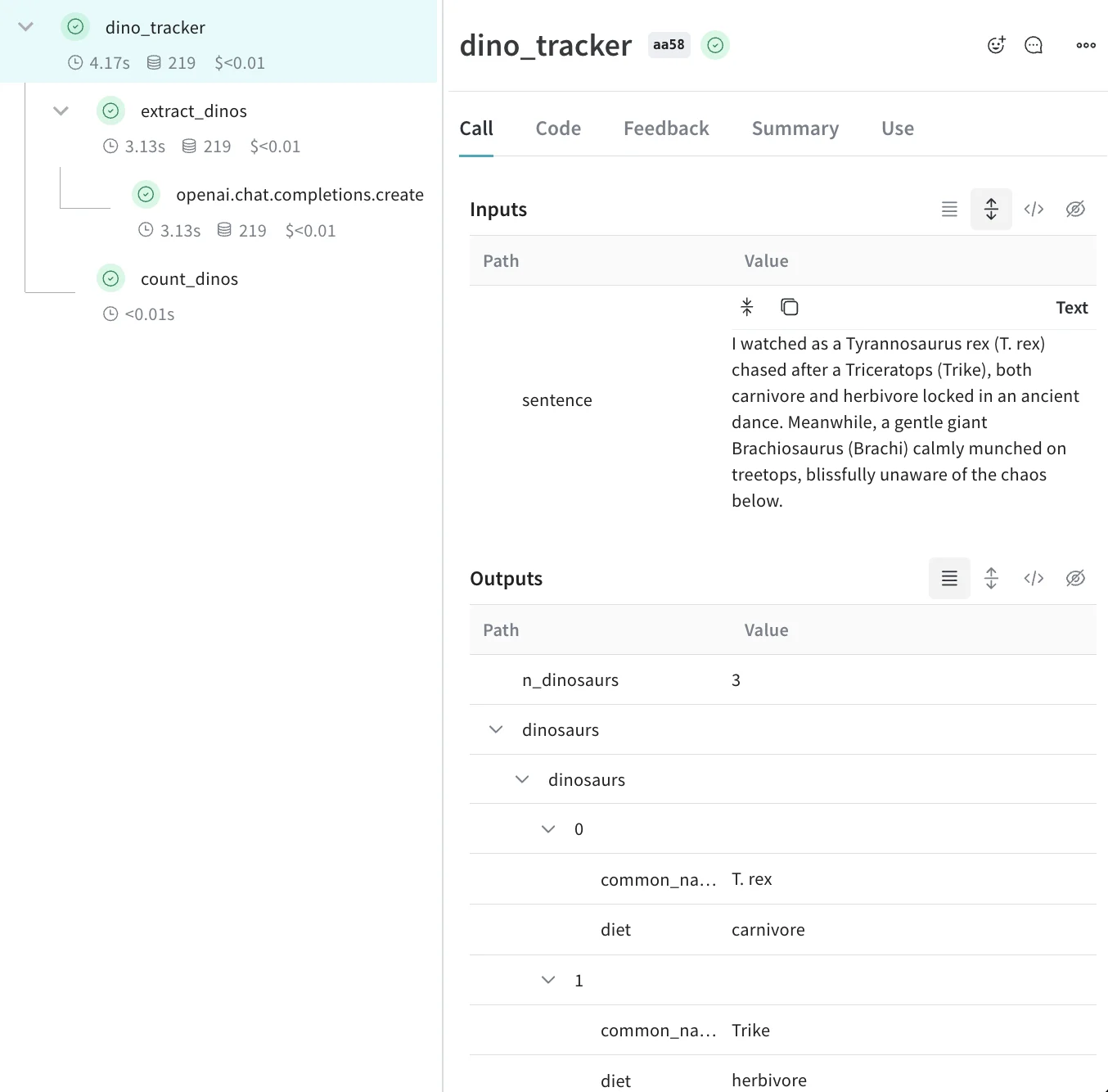
After running the code, you have a complete nested trace in Weave that captures each function call and its relationship to the others.

Track metadata

Now that Weave traces your nested functions, you can enrich those traces with additional context about the run, such as the user or environment. You can track metadata by using the weave.attributes context manager and passing it a dictionary of the metadata to track at call time. Continuing the previous example:
import weave

weave.init('jurassic-park')

sentence = """I watched as a Tyrannosaurus rex (T. rex) chased after a Triceratops (Trike), \
both carnivore and herbivore locked in an ancient dance. Meanwhile, a gentle giant \
Brachiosaurus (Brachi) calmly munched on treetops, blissfully unaware of the chaos below."""

# track metadata alongside the previously defined function
with weave.attributes({'user_id': 'lukas', 'env': 'production'}):
    result = dino_tracker(sentence)
Track metadata at run time, such as your user IDs and your code’s environment status (development, staging, or production).To track system settings, such as a system prompt, use Weave Models.
For more information on using attributes, see Define and log attributes.

What’s next

  • Follow the App Versioning tutorial to capture, version, and organize ad-hoc prompt, model, and application changes.